Guide · 7 minute read
How to add answer keys to a puzzle book
How to add answer keys to a puzzle book: where to put them, how to number and size solutions, and how to make sure every answer matches its puzzle.
Last updated
An answer key looks like the least interesting part of a puzzle book. It is also one of the parts readers check most carefully, and one of the most common sources of bad reviews: "no answers", "the answers don't match", "answer 47 is wrong". This guide covers where to put answers, how to lay them out, and how to make sure they are right.
Why the answer key matters
Readers use the answer key in three ways: to check a finished puzzle, to get unstuck, and to settle a disagreement with the person they are solving with. If any of those fails, the reader stops trusting the whole book. Many buyers look for "answers included" in the listing before they buy.
Where to put the answers
At the back of the book. This is the standard. It keeps the answers out of sight while the reader is solving, and makes them easy to find.
Not right after each puzzle. Putting an answer on the next page spoils the next puzzle, because the reader sees it while turning the page.
Not upside down on the same page. This used to be common in newspapers, but in a book it is hard to read and easy to see by accident.
If your book has several sections (say, sudoku and word search), you can either keep all answers in one section at the back, in the same order as the puzzles, or put each section's answers at the end of the section. One answer section at the back is simplest and most common.
Numbering
Every puzzle needs a number, and its answer needs the same number. Use one sequence through the whole book (Puzzle 1 to Puzzle 200) rather than restarting in each section, unless the sections are clearly labelled in the answers too. A reader with puzzle 87 open should be able to find answer 87 in seconds.
Print the number clearly next to each solution, not tucked in a corner.
Size and layout
Answers don't need to be as big as the puzzles. The reader is checking, not solving, so solutions can be printed smaller, several to a page:
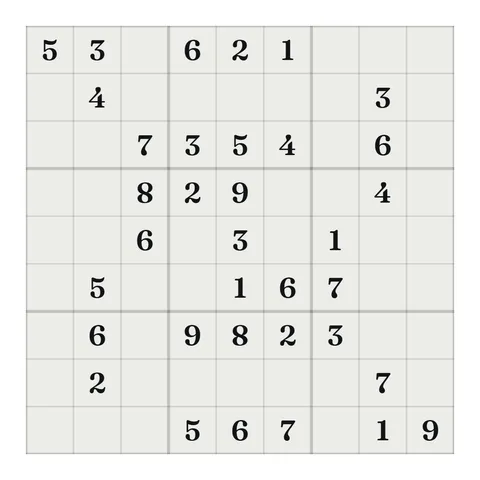
- Sudoku and other number grids. Several small grids per page, in rows. Make given numbers and solved numbers look different if you can, so the reader can compare.
- Word search. The grid with the words marked, such as circled or highlighted. Smaller grids, two or more per page, work well.
- Mazes. The maze with the path drawn.
- Crosswords and fill-ins. The filled grid.
- Cryptograms and scrambles. The decoded saying or the list of real words.
- Logic puzzles. The final matches, often as a short table.
Keep answers inside the same margins as the rest of the book. The gutter applies to answer pages too, and the answer key adds pages, which can push the book into a wider gutter band. See KDP margins for puzzle books.
Making sure the answers are right
This is the important part.
Every puzzle must have exactly one answer. If a sudoku has two solutions, any answer you print will look wrong to half the readers who solve it. Check each puzzle for uniqueness, or use a generator that does.
The printed answer must belong to that puzzle. It sounds obvious, but if you replace or regenerate a puzzle while building the book, the answer has to change too. Copying and pasting answers by hand makes this easy to get wrong.
The order must match. If you reorder puzzles, reorder the answers.
Spot-check before you upload. Pick a few puzzles from different parts of the book and compare them with their answers.
How much space answers take
As a rough guide, if you fit four to six solutions on a page, the answer key adds one page for every four to six puzzles. For a 150-puzzle book, that is roughly 25 to 40 pages. Plan for it from the start, because it affects the page count, the gutter and the spine.
A heading and a short note
Start the answer section with a clear heading ("Answers" or "Solutions") so readers can find it when flipping through. A one-line note helps too, for example: "Each solution is numbered to match its puzzle."
Common answer key mistakes
No answer key at all. Some publishers leave it out to save pages. Readers notice, and many reviews of puzzle books mention it.
Answers that are too small. Solutions can be smaller than puzzles, but not so small they can't be read. Large print books need a readable answer key too: an older reader checking answer 120 shouldn't need a magnifying glass.
Numbering that restarts. If section one is Puzzles 1 to 50 and section two is also Puzzles 1 to 50, the answer key becomes confusing. Either number straight through the book or label each answer with its section.
Answers that leak. If the first answer page faces the last puzzle page, the reader sees answers while solving. Start the answer section on a new page, ideally a right-hand page, with a heading.
Forgetting the extra pages. The answer key can add 20 percent or more to the page count. That can move the book into a wider gutter band and changes the spine width, so finish the answer key before you set margins and size the cover.
Answer keys for different puzzle types
Each puzzle type shows its answer differently. Number puzzles (sudoku, kakuro, killer, number pyramids, magic squares) show the completed grid. Word puzzles show the words found or the completed words: circled in a word search, filled in a crossword, written out for scrambles and ladders. Mazes show the path. Logic grids show the final matches. Nonograms show the finished picture. Whatever the type, the reader should be able to compare their work with the answer at a glance.
How Puzzlil builds the answer key
In Puzzlil, the answer key is on by default. Every puzzle is checked for one answer before it is placed, and its solution goes in the answer section at the back, in the same order, with the same number. Solutions are printed smaller, several to a page. When you regenerate or remove a puzzle, its answer changes or goes with it, so the key always matches. The page count, gutter and cover update to include the answer pages.
You can see how answers look for each type on the puzzle types pages.
Questions
Do all puzzle books need an answer key?
Almost all. Reviews often mention a missing or wrong answer key, and buyers expect one.
Can answers go right after each puzzle?
They can, but it spoils the puzzle on the next page. The back of the book is the usual place.
How many answers fit on a page?
It depends on the puzzle and trim size. Small grids fit several per page; big ones need more room.