Guide · 7 minute read
Puzzle book interior checklist before you upload to KDP
A puzzle book interior checklist to run before you upload to KDP: trim, page count, margins, fonts, puzzles, answer key, front matter and the previewer.
Last updated
Uploading a puzzle book to KDP and seeing an error in the previewer is frustrating. Publishing one and finding a problem in the first review is worse. Most of these problems are small and easy to catch if you check in the right order. This is the checklist we use for puzzle book interiors, from the file settings to the last page.
1. Trim size
- The PDF page size is exactly your trim size (for example 8.5 x 11 in).
- It matches the trim size you will choose in KDP's paperback setup.
- Every page in the PDF is the same size.
A PDF built at a slightly different size, or at A4 instead of 8.5 x 11, will be rejected or scaled.
2. Page count
- The total is between 24 and 828 pages.
- The total is even. If it is odd, add a blank page at the end.
- It includes everything: front matter, puzzles, answers and back matter.
3. Margins
- The inside margin (gutter) is right for the final page count:
| Page count | Inside margin |
|---|---|
| 24 to 150 | 0.375 in |
| 151 to 300 | 0.5 in |
| 301 to 500 | 0.625 in |
| 501 to 700 | 0.75 in |
| 701 to 828 | 0.875 in |
- The gutter is on the correct side of each page (mirrored: left on right-hand pages, right on left-hand pages).
- Outside, top and bottom margins are at least 0.25 in (0.375 in if the book has bleed).
- Nothing important sits on the margin line: page numbers and headings are inside too.
The margin calculator works these out for you, and the margins guide explains them.
4. Bleed
- You know whether the interior has bleed. Most puzzle books don't.
- If it does, the PDF is 0.125 in bigger on the outside, top and bottom, and you choose bleed in KDP's setup.
- If it doesn't, nothing is printed to the edge of the page.
5. Fonts and quality
- All fonts are embedded in the PDF.
- Grids and lines are crisp: vector lines or high-resolution images (300 DPI).
- No text is too small to read once printed. Print a test page.
6. The puzzles
- Every puzzle has exactly one solution.
- Every word search word is in its grid, once.
- Every maze has a path from start to finish.
- Difficulty matches what the listing promises.
- No puzzle is repeated in the book, or from another book in your series. See series without duplicates.
- Each puzzle page has a number, and instructions where needed.
7. The answer key
- Every puzzle has an answer.
- Each answer has the same number as its puzzle.
- The answers are in the same order as the puzzles.
- Spot-check: pick five puzzles from different parts of the book and compare them to their answers.
More in how to add answer keys.
8. Front and back matter
- A title page with the book's title (matching the cover and listing).
- A copyright page.
- A contents page if there are several sections.
- A how-to-play page for each puzzle type, especially for beginners and large print readers.
- Any back pages (author note, review request) are short and inside the margins.
9. Words and spelling
- The title is spelled the same on the title page, the cover and the listing.
- Word lists are spelled correctly and fit their themes.
- Headings and instructions are proofread.
10. The cover matches the interior
- The cover is sized for this page count and paper (see cover size and spine width).
- Spine text only if the book has 79 pages or more.
- The barcode area on the back is clear.
11. The previewer
- Upload the interior and cover in KDP.
- Open KDP's previewer and page through every page.
- Look for warnings, content near the spine or edges, and pages out of order.
- For a first book, order a proof copy and solve a couple of puzzles on paper.
When to run the checklist
Run it twice. Once when the interior is "finished", before you size the cover, and once more after any change, however small. Adding five puzzles, removing a section or switching to large print all change the page count, which can change the gutter, the spine and the cover. Most upload problems come from a change made after the last check.
Keep a copy of what you uploaded
Save the exact interior and cover PDFs you upload, with the date. If a reader reports a problem, or you want to make Volume 2 in the same style, you'll know exactly what was printed.
What Puzzlil checks for you
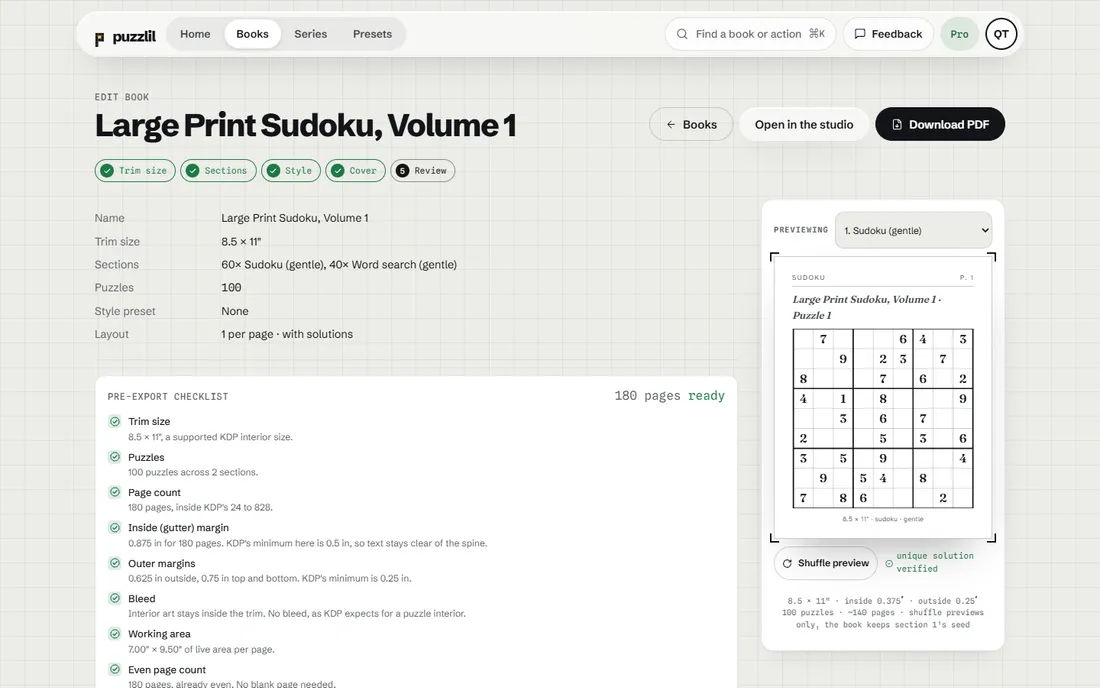
Before you export, Puzzlil's checklist confirms the trim size, the content, the page count (24 to 828), the gutter for the real page count, the outer margins, bleed, the working area, an even page count (adding a blank page when needed) and embedded fonts. Every puzzle is checked by a solver before it is placed, and the answer key is built to match. Cover Studio sizes the cover from the same page count.
That leaves the parts only you can judge: the niche, the title, the words, and the final look in KDP's previewer. You can see each check on the puzzle type pages, and try the free calculators without an account.
Questions
What is the most common reason a puzzle book is rejected?
Content too close to the edge or the spine. Check the gutter for your final page count.
How do I check fonts are embedded?
Your PDF tool's document properties list the fonts and whether they are embedded. Puzzlil embeds them in every export.
Should I order a proof copy?
It is a good idea for a first book, to see the print quality and grid sizes on paper.