Guide · 8 minute read
KDP cover size and spine width for puzzle books
How to work out a KDP paperback cover size and spine width for a puzzle book: the formula, paper thickness, bleed, spine text and the barcode area.
Last updated
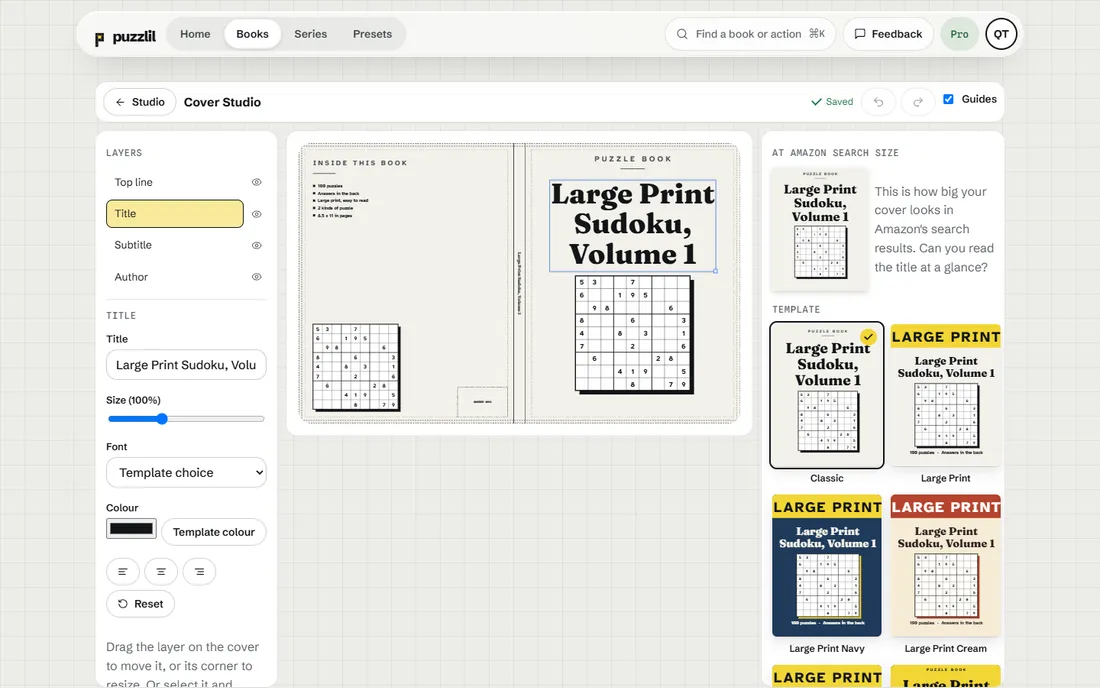
A KDP paperback cover is not a picture of the front of your book. It is one wide file that wraps around the whole book: the back cover, the spine and the front cover, with a little extra on every edge. Getting its size right depends on three things you already know: your trim size, your page count and your paper. This guide explains how they fit together.
The parts of a paperback cover
Lay the printed cover flat, outside facing up, and from left to right you see:
- Bleed, a strip that will be trimmed off.
- The back cover, the same width as your trim.
- The spine, whose width depends on how thick the book is.
- The front cover, the same width as your trim.
- Bleed again on the right.
There is also bleed at the top and bottom. KDP's bleed for covers is 0.125 in on each outside edge.
The formula
For a paperback cover:
- Width = 0.125 + back cover width + spine width + front cover width + 0.125
- Height = trim height + 0.25
The back and front cover widths are both the trim width. So for an 8.5 x 11 book:
- Width = 0.125 + 8.5 + spine + 8.5 + 0.125 = 17.25 in + spine
- Height = 11 + 0.25 = 11.25 in
The only number that changes from book to book of the same trim size is the spine.
Spine width
The spine is as thick as the stack of pages inside. So spine width is the page count multiplied by the thickness of one page. Paper thickness depends on the paper you choose:
- White paper: about 0.002252 in per page.
- Cream paper: about 0.0025 in per page, a little thicker.
For example, a 120-page book on white paper has a spine of roughly 120 x 0.002252 = 0.27 in, before any allowance. Puzzlil's Cover Studio and its spine width calculator use these per-page numbers. Always check the final size against KDP's own cover template or previewer, because KDP's tools are the final word.
Finish the interior first
Because the spine depends on the page count, you can't size the cover until the interior is finished. That includes the answer key, any front matter, and the blank page added to make the count even. A common mistake is to design the cover early, then add 20 pages of answers, and upload a cover whose spine is too narrow.
The safe order is: finish the interior, note the final page count, then size and lay out the cover.
Spine text
Text on the spine (usually the title and author name) is only allowed from 79 pages. Below that, the spine is too narrow to print text reliably, so leave it blank.
Even above 79 pages, keep spine text small and centred, with a little space on each side, because the fold can shift slightly when the cover is wrapped.
The barcode area
KDP prints a barcode on the back cover, at the bottom right. Keep that area free of text and important art. A plain background there is fine.
Resolution and file type
Build the cover at the full size from the formula, at 300 DPI for images. KDP asks for a print-ready PDF. Embedded fonts and sharp images matter as much on the cover as inside.
At 300 DPI, an 8.5 x 11 cover with a 0.3 in spine is about 5,265 x 3,375 pixels. The cover size calculator shows the pixel size for your book.
Safe zones
Keep important text and images away from the trim lines on every side and away from the folds on either side of the spine. The cut and the fold can each move a little in printing. A margin of safety inside the trim lines prevents titles from being cut off.
Design tips for puzzle book covers
- Say what is inside. "Sudoku", "Word Search", "Large Print": the words that match how buyers search.
- Show a puzzle. A grid on the cover tells a buyer what the book is in a fraction of a second.
- High contrast. Covers are mostly seen as small thumbnails in search results.
- Fit the reader. Bright and playful for children, calm and clear for large print.
Common cover sizing mistakes
Sizing the cover before the interior is final. The spine depends on the final page count. Add the answer key or a few extra puzzles, and the spine grows.
Using the front cover size for the whole cover. A KDP paperback cover is the full wrap, not just the front. A front-only image will be rejected.
Forgetting the bleed. The cover is 0.125 in bigger on every outside edge. Without bleed, a thin white line can appear at the edge after trimming.
Choosing the wrong paper. White and cream paper have different thicknesses, so the spine width differs. Size the cover for the paper you will choose in KDP's setup.
Spine text on a thin book. Below 79 pages, leave the spine blank.
Text too close to the folds. The fold between spine and cover can shift slightly. Keep the title and author name well inside the spine and away from the edges of the front cover.
A worked example
An 8.5 x 11 sudoku book of 200 pages on white paper: the spine is about 200 x 0.002252 = 0.45 in, before any allowance your tool adds. The full cover is then about 0.125 + 8.5 + 0.45 + 8.5 + 0.125 = 17.7 in wide and 11.25 in tall. The same book on cream paper has a spine of about 0.5 in, so the cover is about 0.05 in wider. Small, but enough for KDP to flag a mismatch.
What Puzzlil does
Cover Studio reads your book's real page count and paper, works out the spine, and lays out the full wrap with bleed. Spine text only appears once the book reaches 79 pages, and the barcode area on the back is left clear. If you add pages, the cover updates. It has 32 templates and 18 colour palettes, and you can add your own image.
If you design covers elsewhere, use the cover size calculator for the dimensions, then check them against KDP's cover template.
Questions
Can I make the cover before the interior?
You can design it, but you can't size it until you know the final page count, because the spine depends on it.
What file format does KDP want for covers?
A print-ready PDF. Check KDP's help pages for current requirements.
Does paper colour change the spine?
Yes. Cream paper is a little thicker per page than white, so the spine is wider.